 AppSwitcher
A window switcher for Mac and Windows.
7-day free trial · One-time purchase · 3 devices · Mac and Windows
Apple silicon, macOS 13 or later. 64-bit Windows 10 and 11.
- Under 7 MB
- download size
- 6 browsers
- with profile support
- No tracking
- no analytics or telemetry
- Same licence
- across all devices
Hold a shortcut, pick a window, let go.
- 01
Hold
Hold the shortcut. Your current app is already selected.
⌘ / AltTab - 02
Move
Press Tab, Shift+Tab or the arrow keys to move between apps.
TabShift+Tab←→ - 03
Drill down
Press Down to open an app's windows, browser profiles or minimised group.
↓ - 04
Back up
Press Up to return to the level above, any time.
↑ - 05
Release
Let go to switch. Press Esc to cancel.
Esc
1 of 5
Nested groups
Features
What AppSwitcher does.
| Feature | What it does |
|---|---|
| All windows | Includes minimised windows and windows on other Spaces or desktops. |
| Search | Start typing while the switcher is open to filter apps and windows. Results can follow the switcher layout, or show as a flat row or a list. |
| Browser tab search | Optionally include your open browser tabs in search results and switch straight to the tab you pick. |
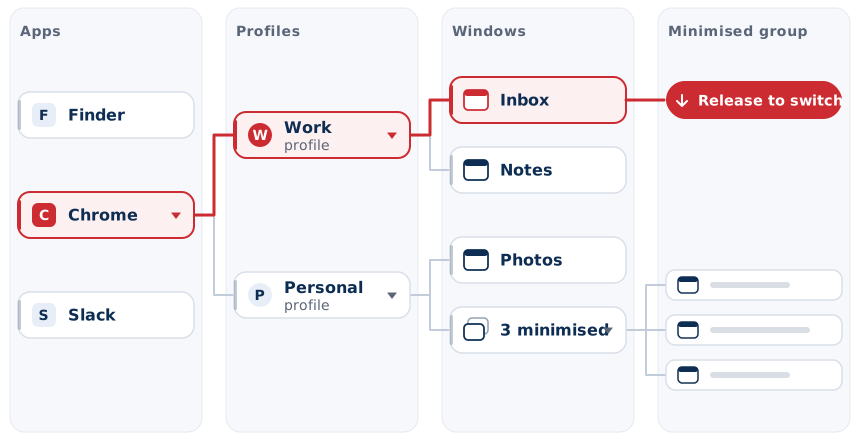
| Nested groups | Windows are grouped under their app. Press Down to open a group, and keep going: app, profile, window, minimised windows. |
| Browser profiles | Chrome, Edge, Brave, Vivaldi, Chromium and Opera profiles can be grouped, listed separately, or shown as their own level. |
| Spaces and virtual desktops | Optional level listing macOS Spaces or Windows virtual desktops. Open one to pick a window on it. |
| Minimised windows | Show them, hide them, or collapse them into one tile. |
| Live previews | Optional preview of the selected window. |
| Custom shortcut | Use ⌘ Tab or Alt Tab, or set your own. |
| Extra shortcuts | Optional shortcuts that open straight to the current app's windows, its profiles, or your Spaces. |
| Recent first | Apps and windows are listed in the order you last used them. |
| Multiple displays | Opens on the display you are using, including over full-screen apps. |
| Menu bar app | Runs from the menu bar or system tray, with no Dock icon. Can start at login. |
| Automatic updates | Signed updates install from within the app. |
One licence for Mac and Windows.
AppSwitcher licence
£14.99 one-time
- 3 devices, Mac or Windows
- Extra devices £3 each
- All 0.x updates
- Automatic, signed updates
- No subscription
VAT, if due, is calculated at checkout. Refund policy
Install with Homebrew
brew install --cask dynacomsolutions/tap/appswitcherThe Mac build is Developer ID signed and notarised by Apple.
System requirements
- Mac
- Apple silicon, macOS 13 or later
- Windows
- 64-bit Windows 10 version 1607 or later, or Windows 11
Frequently asked questions
Does AppSwitcher replace Cmd+Tab or Alt+Tab?
Yes, if you want it to. It uses ⌘ Tab on Mac and Alt Tab on Windows by default. Choose a different shortcut in Settings to keep the built-in switcher.
Is it a subscription?
No. It is a one-time purchase of £14.99 for 3 devices, including all 0.x updates. Extra devices are £3 each.
Can I use one licence on Mac and Windows?
Yes. The 3 devices can be any mix of Macs and PCs. You can remove a device in Settings.
Which browsers support profile grouping?
On Windows: Chrome, Edge, Brave, Vivaldi, Chromium and Opera. On Mac: Chrome and other Chromium browsers, including Edge, Brave and Vivaldi.
What permissions does it need on a Mac?
Required: Accessibility and Input Monitoring. Optional: Screen Recording, only for live previews, and Automation, only for browser tab search (macOS asks once per browser). Captures stay on your Mac.
Does AppSwitcher collect my data?
No. There is no analytics or tracking. It only connects to dynacom.studio to check your licence and for updates.
Which Macs and PCs are supported?
Apple silicon Macs running macOS 13 or later, and 64-bit PCs running Windows 10 (version 1607 or later) or Windows 11.